The song editor
Rhyme colors and margins
Colour the rhymes in your lyrics, and show each line's syllable count and rhyme-scheme letter in the margins of the Lyric Genie web editor.
The View menu changes how your lyrics look without changing the lyrics. It has three options, and all three start off.
| Option | What it shows |
|---|---|
| Rhyme colors | Words that rhyme with each other, in matching colours. |
| Syllable counts | Each line's syllable count, in the left margin. |
| Rhyme scheme | Each line's rhyme letter (A, B, C…), in the right margin. |
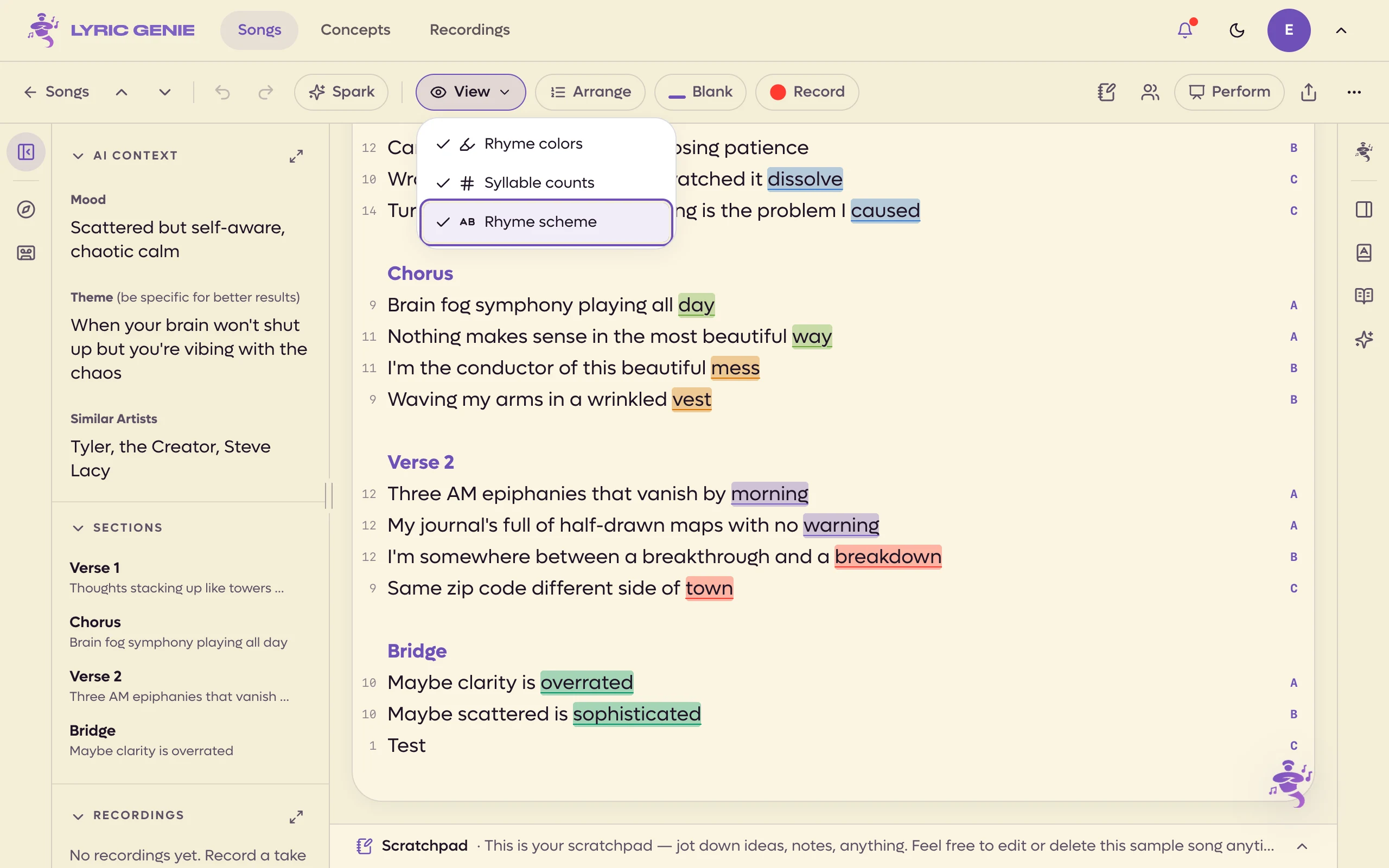 1234
1234
- 1Highlighted while anything is on
- 2Same colour, same rhyme
- 3Syllables per line
- 4Rhyme scheme, per stanza
You can turn on any mix of them. The View button is highlighted while any of them is on, so you can tell at a glance.
Where the menu is#
On a computer, View is in the song bar along the top of the song, next to Wish or Spark. In a phone browser it is the last button in the bar along the bottom. See The desktop workspace.
Click an option to tick or untick it. The menu stays open, so you can try them one after another.
The menu hides while Arrange mode is on.
Rhyme colors#
Words that rhyme get a tint and an underline in a shared colour, so a rhyme running through a verse shows up as a pattern.
It judges rhymes the way a listener would hear them, within each stanza:
- Line endings count when they are Perfect or Near rhymes, as the rhyme engine judges them, and no more than two lines apart.
- Words inside lines only count as Perfect rhymes, on the same line or the next.
A stanza here is a run of lines with no blank line between them. Section headers, very short words and the most common little words are left out, and it takes two different words to make a rhyme. Slant rhymes are never coloured.
Rhyme colours are off each time you open a song.
Syllable counts#
A small number in the left margin of every lyric line gives its syllable count. It updates as you type. Section headers and empty lines get no number, and a blank counts as the syllables it stands for.
The number is the line's usual spoken count. Words that can be sung shorter or longer still count once. To change a line's length, see Syllables.
Rhyme scheme#
A letter in the right margin of each line shows which lines rhyme. The first ending in a stanza is A, the next one that does not rhyme with it is B, and so on. A line whose ending rhymes with an earlier one takes its letter.
- Letters start again at A in each stanza.
- A line that only slant-rhymes an earlier group gets that letter with a mark, like A′.
- A line that ends in a blank gets no letter.
The letters come from the same rhyme engine as the rhyme colours, so they settle a moment after you stop typing rather than on every key.
Good to know#
- The margins are remembered by this browser, for every song. Rhyme colours are not.
- Margin numbers and letters are not part of the lyrics. They cannot be selected and are not copied or shared.
- All three work on a co-writer's tab and the Master too, since they only read the lyrics.
- None of them use AI or count toward your plan.