The five tabs
The Start tab
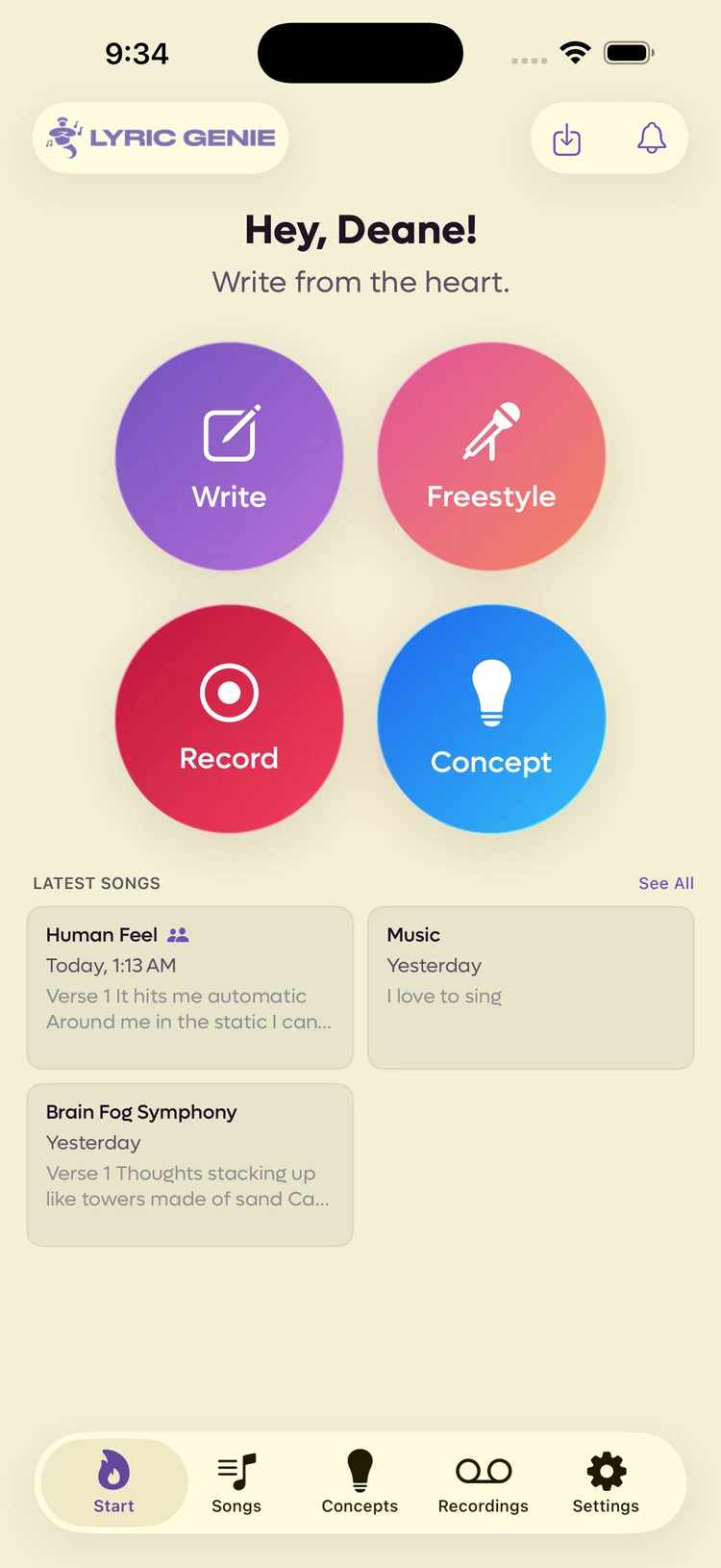
The launch pad. Four ways into a song, your recent work, and the two buttons in the corner.
The Start tab is the only tab that holds nothing of its own. It exists to get you writing in one tap, and to put the thing you were last working on in front of you.
 123
123
- 1Import a file, and what you missed
- 2Four ways to begin
- 3Everything you were last working on
The four ways in#
| Button | What it does | More |
|---|---|---|
| Write | Opens a new song, guided or blank. | The song wizard |
| Freestyle | Records straight away and turns what you sang into lyrics. | Freestyle |
| Record | Captures audio with no song attached yet. | Recordings |
| Concept | Saves an idea you are not ready to write. | Concepts |
The split worth understanding is between the top row and the bottom row. Write and Freestyle start a song. Record and Concept capture something smaller that can become one later.
Latest songs#
Underneath is what you touched most recently, newest first, with the opening lines of each so you can tell them apart without opening them. See All goes to the full library. See The Songs tab.
A icon beside a title means that song is shared.
The two buttons in the corner#
| Button | What it does |
|---|---|
| Import | Takes an audio file or a text document and works out which it is. See Importing files. |
| Notifications | What happened while you were away. A red dot means something is waiting. See Notifications. |
Where to go from here#
How it fits together covers the other four tabs and, more usefully, how the things in them relate. It is the page that saves you the most time later.