Your account
Plans and Pro
What the free plan includes, what Pro adds, and which limits govern what.
Showing the iOS appweb app
Lyric Genie is free to use. Pro adds the AI writing tools and lifts the caps on rhymes and recording.
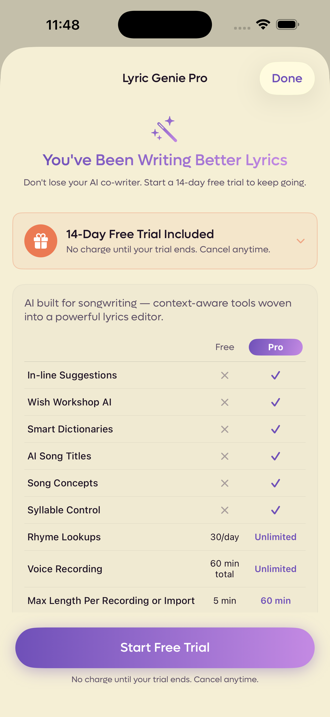
One plan, both apps#
Pro belongs to your account, not to a device. Subscribe in the web app or in the iOS app, and the same plan applies on the web, your iPhone and your iPad. You only ever need one subscription.
New to Pro? The first 14 days are free, whichever app you start in. The trial is only offered once per account, so if you have had one before, Pro starts straight away.
Upgrade is in Settings, beside your plan, and the same dialog opens when you run out of free AI calls. Pick yearly or monthly and click Continue to checkout. Payment is handled by Stripe, and you come back to Settings once it is done. Pro switches on a moment later.
Usage & Stats in Settings shows your recording storage and AI use against the limits below.
Subscribe from Pro Subscription in Settings, or from any upgrade screen. Payment goes through your Apple ID.
If you already have Pro from the web, the Pro screen says so and links to the web app's Settings, where that subscription is managed. It does not offer you a second one.
Since iOS 2.23 the app checks before it shows any plans. If it cannot reach us to check, it hides the plans and asks you to try again, rather than risk you paying twice. If an account somehow has Pro from both the App Store and the web, the Pro screen says You're also subscribed on the web and tells you how to cancel one of them.
Sessions: the host pays#
Starting a session needs Pro. Joining one does not: while a Pro writer is in the session, everyone in it is covered, with the DAW, computer audio and recording included. If nobody in it has Pro, joining explains why it was refused.
What Pro adds#
| Feature | Free | Pro |
|---|---|---|
| In-line suggestions | Try | Yes |
| Wish Workshop | Try | Yes |
| Smart dictionaries | Try | Yes |
| AI song titles | Try | Yes |
| Song concepts and Spark | Try | Yes |
| Syllable control | Try | Yes |
| AI calls | 15 in total | 5,000 a month |
| Quick AI calls (suggestions, rhyme picks) | 50 in total | 20,000 a month |
| Rhyme lookups | 30 a day | Unlimited |
| Voice recording | 60 minutes in total | 10,000 minutes in total |
| Longest single recording or import | 5 minutes | 60 minutes |
| Original files (keep imported audio as uploaded) | No | Yes |
| Genie chat | Uses your AI calls | 1,000 messages a month |
| Sessions | Join one while a Pro writer is in it | Host and join |
"Try" means the free plan includes 15 of the larger AI calls and 50 of the lighter ones, so every AI feature above can be tried before paying. Pro raises that to 5,000 and 20,000 a month, reset on the 1st. See Plan limits.
Original files#
When you import audio, Lyric Genie converts it to M4A so it plays everywhere. On Pro it also keeps the file exactly as you uploaded it, a WAV stays a WAV, and you can download it again from the take's menu with Download Original.
Each original can be up to 250 MB, and you can keep 10 GB of them in total. Original Files in Settings lists them, shows the space they use, and lets you download or delete them. On a shared song, collaborators can download your originals too (in the web app).
If Pro ends, your originals are kept for 30 days and you get an email before they go. Come back to Pro inside that window and nothing is deleted. Your converted recordings are never affected.
What is free, and stays free#
Three things people assume are paid, and are not.
- Collaboration. Inviting collaborators, tabs, chat, sending lines, the Master tab. All of it. A song can have up to 8 writers, on any plan.
- Lyric sheets. Making them and sharing them.
- Recordings linked to lyrics. Tying a take to particular words.
Also free: writing, arranging, sections, Perform, importing, and the Scratchpad.
How the limits actually work#
Rhyme lookups count distinct words per calendar day. Looking up a word you already looked up today is free and does not count again, so revisiting your own work never costs you anything. A counter appears once you are running low.
Recording storage is a total, not a monthly allowance. Deleting old recordings gives the space back.
Longest recording applies per item, to both what you record and what you import. A long file is refused with its length in the message, rather than silently truncated.
When you are running out of recording space iOS app only#
The app warns you before you hit the wall rather than after. At around ninety per cent of your total it says You're running low on storage, with how many minutes you have used and how many you have.
At the cap it says Storage limit reached with the same numbers. Both alerts carry an Upgrade to Pro button beside OK, so the upgrade is right there if that is what you want. Deleting recordings you no longer need also works, and gives the space back immediately.
Have a code? Web app only#
If someone gave you a Lyric Genie code, click Have a code? in the upgrade dialog, type it, and continue to checkout. A code that makes Pro free skips the trial and does not ask for a card. Each code works once. If it has already been used, the dialog says so.
Cancelling: do it where you subscribed#
A subscription can only be cancelled by whoever bills it.
- Subscribed on the web (Stripe): cancel in the web app's Settings.
- Subscribed in the iOS app (Apple): cancel in your Apple ID's subscriptions, on an iPhone, iPad or Mac.
Either way, you keep Pro until the end of the period you have paid for, and nothing is deleted when it ends. You go back to the free plan's limits. The one exception is original files, which are kept for 30 days and then removed.
If you subscribed on the web, open Settings. Under your plan, click Cancel subscription and confirm on the page that opens. Settings then says Cancelled, Pro until and the date. Changed your mind? Resume is in the same place until that date. Manage opens the same page for switching between monthly and yearly, changing your card, or downloading invoices.
If you subscribed in the iOS app, Settings says Billed through the App Store and offers Manage in App Store. Cancel from an Apple device, or follow Apple's steps, which Settings links to. The web app cannot cancel an Apple subscription.
Starting a trial iOS app only#
The Pro screen offers a free trial, then a monthly price, with an annual option that works out cheaper per month. Nothing is charged until the trial ends.
If you have used a trial on this Apple ID before, the app says so and offers the subscription without one.
Cancelling an App Store subscription iOS app only#
There is no cancel button inside the iOS app, and there cannot be. A subscription bought in the app is billed by Apple, and only Apple can stop it. That is the same for every app on the App Store. If you subscribed on the web instead, cancel in the web app's Settings.
To cancel an App Store subscription, on the iPhone or iPad you subscribed on:
- Open the Settings app, the grey one with the gears, not Lyric Genie.
- Tap your name at the very top.
- Tap Subscriptions.
- Tap Lyric Genie.
- Tap Cancel Subscription, and confirm.
The App Store app gets you to the same place: tap your photo in the top right, then Subscriptions.
If you cannot find Lyric Genie in that list, either you subscribed on the web, or you are signed in to a different Apple ID from the one that bought it. An App Store subscription belongs to an Apple ID, not to your Lyric Genie account.
If you cancelled and changed your mind iOS app only#
Cancelling a subscription does not switch Pro off straight away. It runs to the end of the period you paid for, and during that window the Pro screen says your subscription is set to expire rather than thanking you for subscribing.
That is when Resume Subscription appears. It opens Apple's own subscription sheet, which is the only place auto-renew can be turned back on. Change Plan is beside it if you want to move between monthly and annual instead.
Once the period actually ends, the screen goes back to the ordinary upgrade offer.
The numbers on this page are generated from the app's own configuration, so they are what your copy of the app is actually enforcing. See also Plan limits.