The song editor
Recordings in a song
Capture audio while you write, attach it to the song, and tie a take to the exact lines it belongs to.
Showing the iOS appweb app
A hummed melody is worth more than a description of one. The song editor lets you record without leaving the page, and keeps the audio attached to the song you were writing.
The three audio buttons sit together in the grey capsule at the top of the song editor.
| Button | What it does |
|---|---|
| Recordings | Opens the audio already attached to this song. |
| Record | Starts recording straight away. |
| Freestyle | Records and turns what you sang into lyrics. See Freestyle. |
On the web there is no button capsule. A Recordings section in the left panel of the song editor lists this song's audio, and its Record and Upload Audio buttons add more. Recordings is also in the song bar's ⋯ menu, and opens that section. Freestyle is not on the web.
The song's recordings#
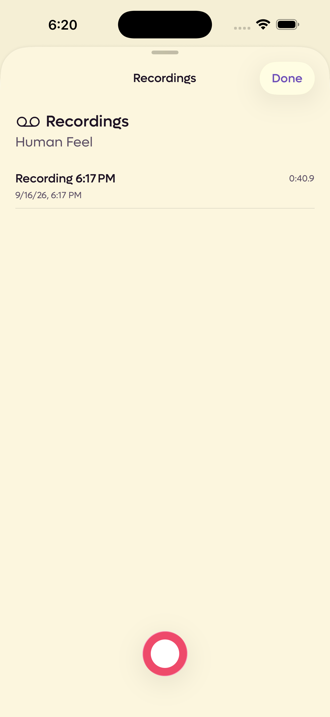 12
12
- 1Everything attached to this song
- 2Add another without leaving
This sheet shows only the audio belonging to the song you have open. Your full library lives in the Recordings tab, which is a view across everything. See Recordings.
On the web this is the Recordings section of the left panel rather than a sheet. Takes linked to lyrics come first. Playback happens in a small player pinned below the editor, and each take's ⋯ menu has its transcript, rename, link and archive options. While a new name is saving, a small spinner shows beside it. Upload Audio adds a file from your computer.
On a shared song, Send to Chat in a take's ⋯ menu puts it in the collaborator chat message box, ready to send. On Pro, Download Original saves an uploaded file exactly as it was. See Original files.
When a notification tells you a collaborator added a recording, clicking it opens the song with the Recordings section showing and that take highlighted.
Importing keeps a stereo file, such as a demo, in stereo and at a higher quality. Takes you record in the app are mono.
A take recorded in a session lands here too, named for where it came from and when, such as Session · Sam's mic · 5:54 PM. A recording of everyone is called Session recording and the time.
The player#
The player below the editor shows the take's name and who recorded it. On a shared song, the play button and the waveform are in that writer's colour.
- Click the waveform to play from that point. Click the take that is playing to pause it.
- The 🔗 button appears when the take is linked to lyrics, and shows you those lines. See below.
- The volume slider, on a computer, sets how loud it plays. The speaker button beside it mutes and unmutes.
Recording while you write#
Tap Record and it starts immediately, because you tapped it with something to sing. The sheet gives you a timecode, Undo, a pause button and Save.
Click Record and a bar opens in the Recordings section with a live level meter, a pause button and Save. Your browser asks for microphone access the first time, and recording cannot start until you allow it. Pause and the meter becomes the take so far, so you can play it back and scrub through it. Each stretch between record and pause is kept separately, and Backspace drops the last stretch, then the one before. Press Enter to save.
Takes are recorded in the browser and saved as AAC .m4a files, the same
format the app uses, so a take made on the web plays in the app. At the length
cap the web stops and saves what it has.
The timecode counts the audio you have actually captured. Pause stops the clock with it, so the number always matches the length of the file rather than the time you spent with the screen open.
Tying a take to particular lines#
This is the part worth knowing about. A recording does not have to belong to the whole song. It can belong to specific words.
Select the lines, then choose one of two things from the row of actions along the bottom of the editor:
- Record starts a new recording anchored to those lines.
- Link to Recording attaches an existing take to them.
On the web both are under ⋯ More on the selection toolbar. A take shows the words it is linked to underneath it, and the chip turns red with a broken link if you later rewrite those lines so that the app can no longer find them.
Linked lines carry a marker in the left margin, in the colour of the writer who made the take. Point at it and it says Play. Click it to play the take from the start.
To find the lines a take belongs to, click its linked lyrics in the Recordings section, the 🔗 button in the player, or Show in song on the Recordings page. The song opens on the right tab, scrolls to the lines, and flashes them so you can see which they are.
Linked lines can then be played back in order, so you can listen through a song in the order you wrote it rather than the order you recorded it. See Selecting and editing lines.
It also works the other way round. Start from a recording and the editor drops into a picking mode, with a banner across the top reading Select lyrics to link. Highlight the lines, tap Link, and the two are tied together. The ✕ on the banner backs out, which is the thing to reach for if you find yourself in this mode and did not mean to be.
On the web, open a take's ⋯ menu and choose Link to Lyrics (Relink to Lyrics if it already has a link). The same banner appears. Select the lines, and the toolbar over them shows just Link.
Transcription#
Recordings with speech in them get transcribed, and the text turns up under the recording with Copy and Insert into Lyrics beside it.
If a recording has nothing recognisable in it, you get Transcription unavailable rather than a wrong guess.
On the web a take that has a transcript shows it under Transcript in its ⋯ menu, with Copy and Insert into Lyrics. Takes without one show no transcript option.
Recordings made outside a song#
Audio captured from the Start tab, or with Record an Idea from Siri or the Action Button, has no song to belong to yet, so it lands in the Recordings tab as an unassigned idea. Open it there and Add to Song attaches it, or New Song creates one around it.