The song editor
Syllables
Make a line one or two syllables longer or shorter without losing what it says.
Showing the iOS appweb app
Sometimes a line says the right thing and does not fit the tune. It is a syllable short, or a syllable too long, and no amount of staring fixes it.
The syllable tool rewrites the line to the length you need and keeps the meaning.
Opening it#
Select a single line and tap +1 Syllable or -1 Syllable in the row of actions along the bottom of the editor. See Selecting and editing lines.
Select a single line and use the −2 −1 +1 +2 group on the selection toolbar. The panel's Syllables section has −1 and +1 as well. The line has to be on a tab you can edit. The rewrites open in a side sheet next to your lyrics, on the tab for the change you picked.
Both only appear for a single-line selection, and -1 Syllable needs a line with at least two syllables to take one away from.
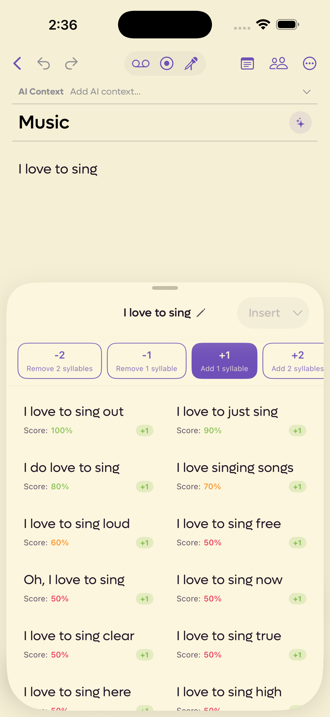 123
123
- 1Tap the pencil to change the line without closing
- 2Go two either way, not just one
- 3How well it kept the meaning
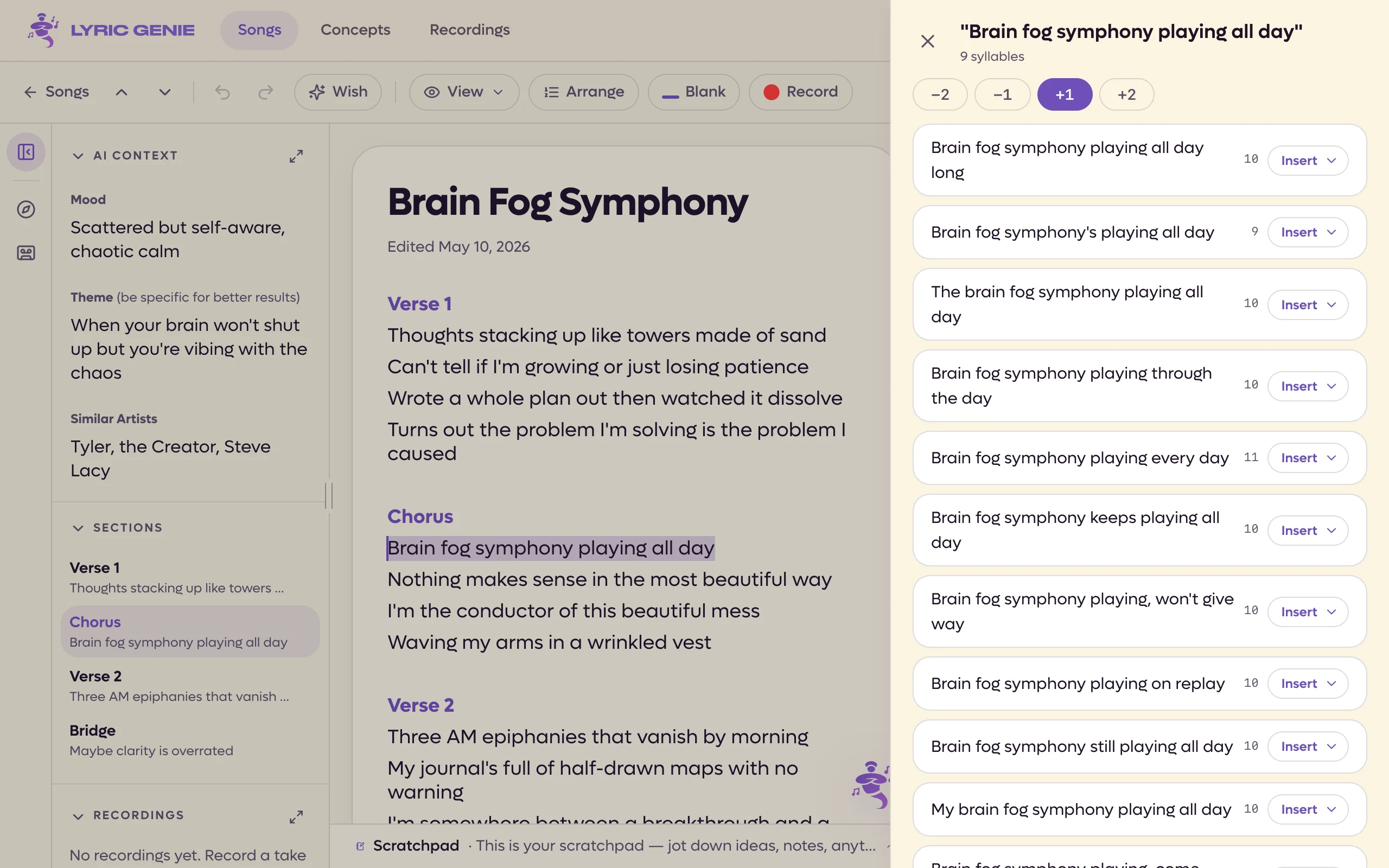 12
12
- 1Two shorter to two longer
- 2Each result's syllable count
Choosing how far to go#
You arrive on the option you picked, and the four tabs let you change your mind without starting again.
| Tab | What it does |
|---|---|
| -2 | Removes two syllables. |
| -1 | Removes one. |
| +1 | Adds one. |
| +2 | Adds two. |
Reading the results#
On the web, each suggestion shows its own syllable count in small type beside it, so you can see it landed where you asked. The meaning score and the change badge described below are in the app.
Every suggestion carries two things.
A score, which is how well the rewrite held on to your original meaning. It is coloured, so a green result kept the sense and a red one took liberties with it. High scores tend to be small additions like I love to sing out. Lower ones rearrange more, like I love singing songs.
A badge showing the change it actually achieved, so you can see it did what you asked rather than drifting to a different length.
Changing the line#
The pencil next to the phrase at the top lets you edit the words and ask again, without closing the sheet and reselecting. Useful when the first answer shows you the line was slightly wrong to begin with.
The web sheet has no pencil. To try different words, close the sheet, edit the line and ask again.
Taking one#
Tap a suggestion to pick it, and Insert wakes up. The chevron beside it offers Insert at Cursor, Insert at Top, Insert at Bottom, Add to Scratchpad and Copy.
On the web every suggestion has its own Insert button, with a menu of the other options beside it.